RETROSPECTIVE
Designing for trust was a key challenge: Parents were wary of automated interactions and concerned that AI might undermine human connection.
I prioritized transparency: We focused on clearly communicating data sources, AI reasoning, and giving users control.
Key takeaway: Trust in AI requires more than accuracy. It depends on clarity, user agency, and alignment with real-world values.


The redesigned experience reduced the friction of navigating multiple tools, helping parents access information faster, spend less time in the app, and feel more confident using it.
Reduced app fragmentation: Cut average logins by 75%, helping parents access information faster.
Introduced AI assistant: Prioritizing key updates and streamlined tasks, cutting in-app time by 66%.
Shifted parent time from navigating tools to supporting their children, boosting overall satisfaction and trust.
66%
Less In-app Time
Overall
Boosted
Satisfaction & Trust
75%
Reduced Logins
IMPACT
Primary CTA moved up:
Improves visibility and quick access.




Greyed-out background:
Directs attention to active interaction.

STRENGTHENING USABILITY & TRUST
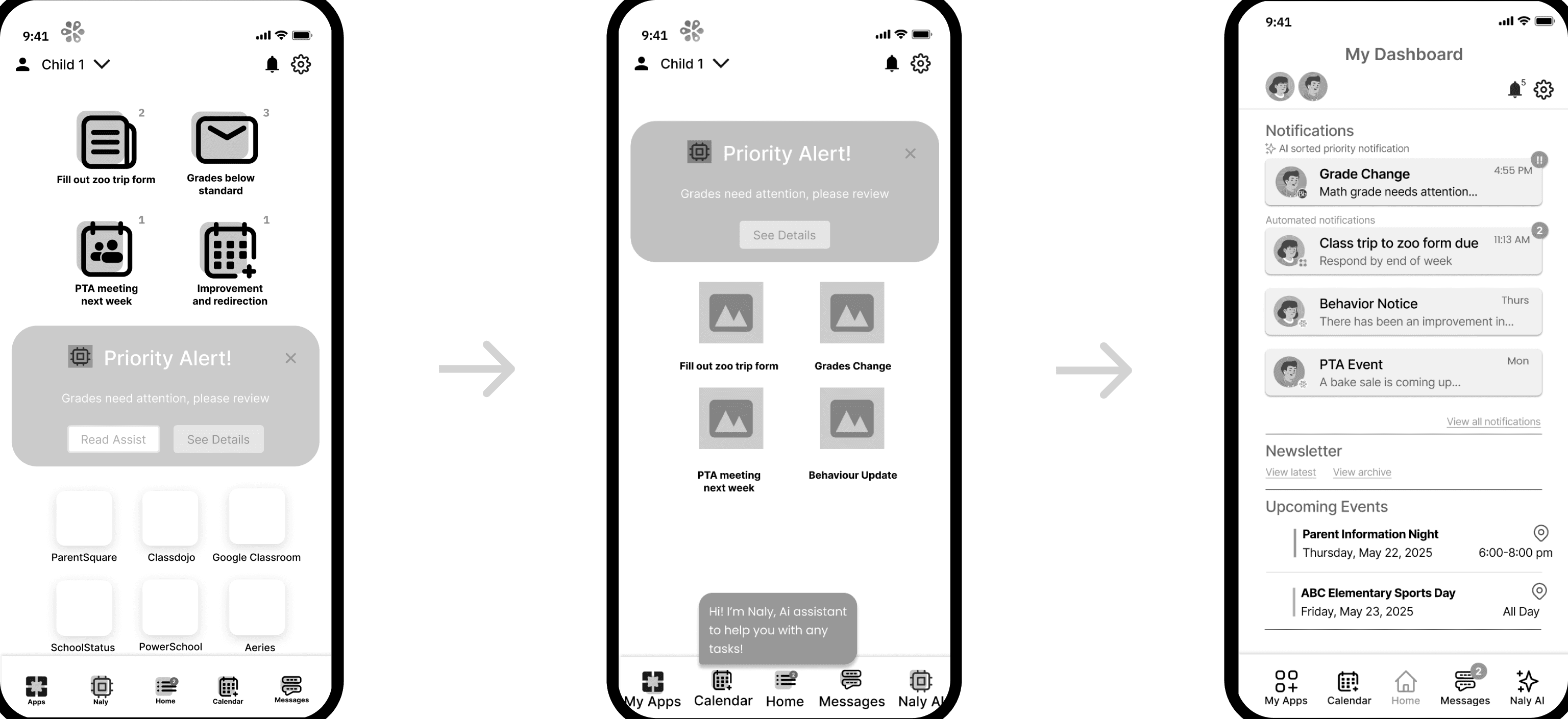
Our research revealed opportunities to simplify the dashboard and clarify the AI’s role, so we iterated on both to create a more intuitive and trustworthy experience.
Key Changes:
Identified most important elements and elements causing confusion or overwhelm.
PRIORITIZATION
Simplified the layout and removed confusing elements in the second iteration.
LAYOUT SIMPLIFICATION
Redesigned notifications using familiar list-style cards and labeled sections to support quick scanning.”
NOTIFICATION REDESIGN
Key Changes
The first iteration revealed that Naly’s role and presence within the interface were not immediately clear to users.
CLARIFYING AI’S ROLE
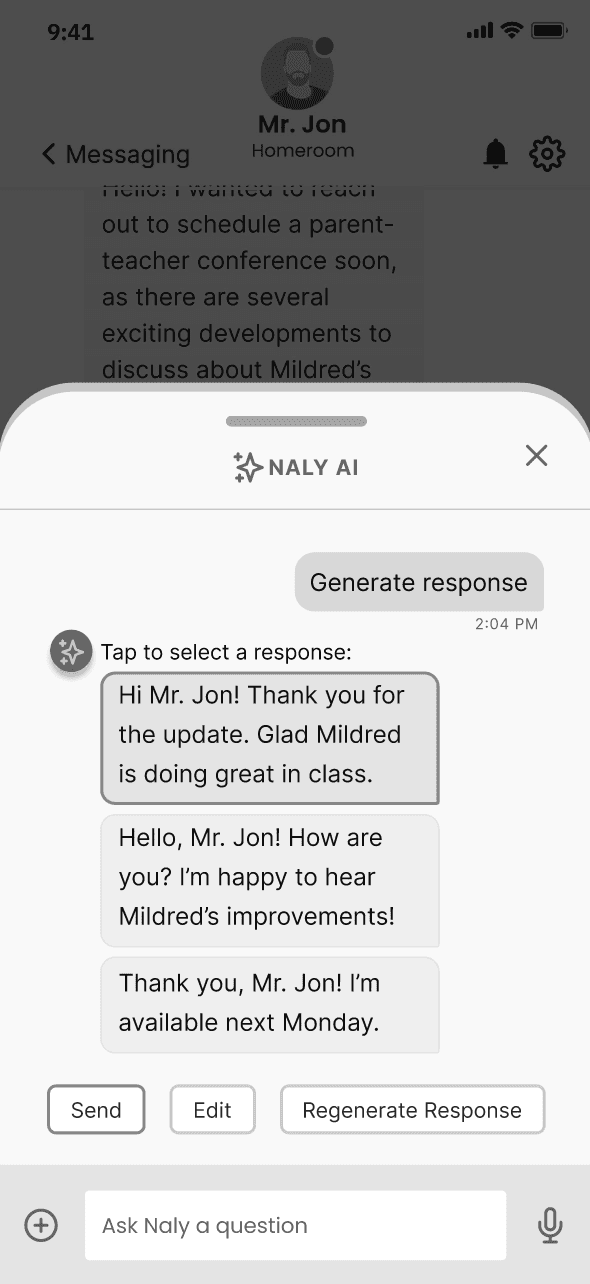
Bottom sheet visually separates AI replies, making them more prominent and accessible.
VISUAL DIFFERENTIATION
Used color contrast to differentiate between the AI and messaging interactions.
OPTIMIZING AI INTERACTIONS
Dashboard Iteration
AI Agent Iteration
USABILITY TESTING


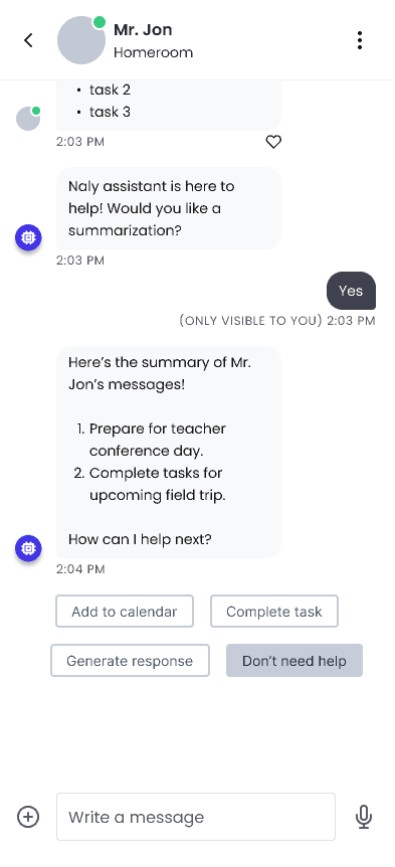
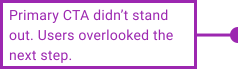
Messages sent to AI felt directionless, reducing trust.
Meaning of number badges was unclear


Usability testing evaluated the early prototype’s ability to address three primary pain points: simplifying communication, reducing information overload, and clarifying AI’s role.
Objective
7 of our original interview participants returned
Moderated remote sessions (via Google Meet + Maze prototype).
Users completed core tasks while we observed interactions in real time.
Follow-up questions probed pain points, expectations, and perceptions of AI support.
Methodology
Key Insights
Too many options cluttered the screen; unclear icons and badges confused parents.
OVERWHELMING LAYOUT
Parents struggled to follow a clear path, causing hesitation and errors.
UNCLEAR TASK FLOW
Parents weren’t sure who received their messages or how Naly (AI) was involved.
MESSAGING CONFUSION
My team needed to test our prototype to validate whether our design decisions were effectively addressing the pain points we identified in our research.
Testing revealed that parents valued consolidation, but struggled with unclear hierarchy and AI roles, guiding our next iteration toward a simpler, clearer, and more trustworthy experience.
EARLY STAGE PROTOTYPE

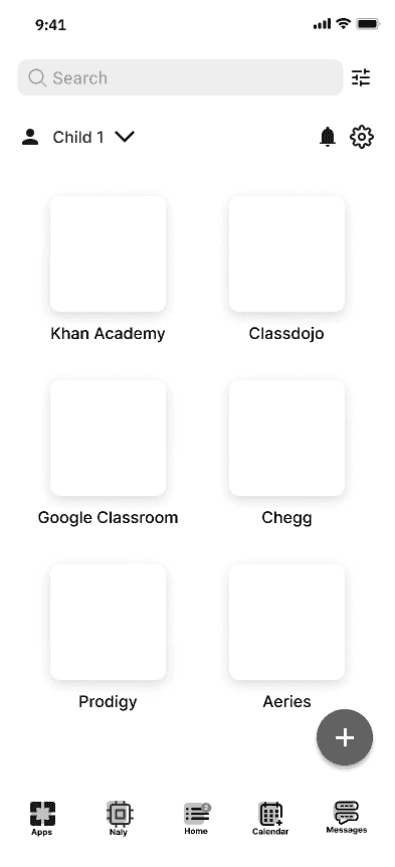
Grade Summary:
Grades paired with teacher context and recommended resources.
App integration:
Unified hub reduces platform switching with connected APIs.
Prioritized dashboard:
Centralized dashboard surfaces urgent tasks parents can’t miss.
My team used our findings to create a low fidelity prototype. This exploration sought to create a unified experience and help parents identify what needs their attention.
END STATE USER JOURNEY
Accesses school platforms
via hub assisted by AI
Sync dates and reminders
in personal calendar
Ask AI for specific info
Complete and confirm forms
Views notifications and
can summarize updates
Initiation
Engagement
Usage
Logs in platform
Anticipation
Serenity
Peace of Mind
Trust
Acceptance
Key features:
Seamless access to school updates through a single hub
Smart notifications
Auto-filled calendars
Naly, an AI assistant handles:
Task management
Calendar syncing
Communication tools
I used our research insights to envision a streamlined journey that reduces platform switching, surfaces relevant information, and gives parents greater confidence in what to do next.
BEGINNING STATE USER JOURNEY
Sifts through cluttered messages for key info
Turns to WhatsApp for
accurate answers
Overwhelmed, stops
engaging
Switches platforms,
repeats search
Entry
Search
Repetiton
Abandonment
Logs in platform, seeking
updates
Neutral/Hopeful
Annoyance
Resignation
Overwhelm
Frustration
Key pain points:
Platform overload creates unnecessary friction.
Poor navigation leads to repeated searches.
Fragmented communication causes parents to miss critical updates.
The map revealed frustration and repetition.
Parents frequently bounced between multiple disconnected platforms.
Many abandoned official tools altogether, relying on WhatsApp groups for reliable updates.
I mapped the current journey to identify where fragmented platforms and repeated searches created friction, frustration, and abandonment.
6 out of 8 users expressed difficulty managing a glut of apps, information, and fragmented communications
Information Overload
7 out of 8 users expressed a desire for a unified, consolidated platform
One-Stop-Shop
More children meant more platforms — and greater frustration.
Numbers Game
8 out of 8 users are open to using an AI product if a direct benefit is demonstrated
Cautious Optimism
With a range of experiences to make sense of, we used affinity mapping to prioritize the issues most relevant to parents. In this way we were able to identify recurring pain points and translate them into clear design priorities.
SYNTHESIS

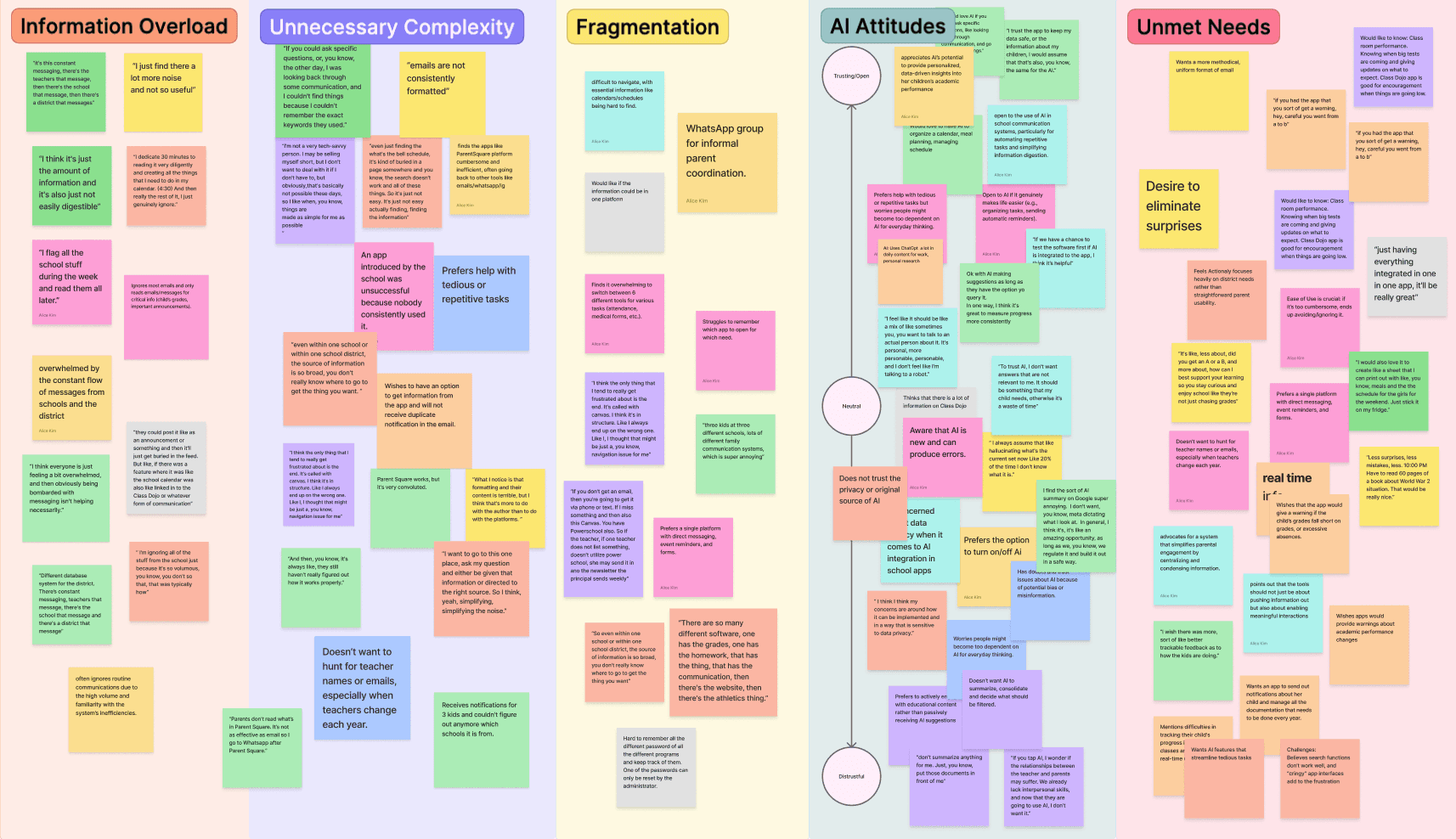
Key Insights

THEME
INSIGHT
EVIDENCE
RECOMMENDATIONS
Info overload
Parents miss
key updates
Powerful search functionality: A robust, intuitive search that spans all integrated sources with filters.
Consistent formatting: Uniform structure and visual hierarchy across content types (e.g., events, grades, messages).
6/8 users overwhelmed by volume
Platforms switching
frustrates users
Results in abandoned
user journeys
All 8 users toggle between multiple apps
Single hub experience: All core school-related tools, updates, and actions are accessible in one interface.
Multi-platform integration: Seamless API connections to consolidate data and actions in one place.
Fragmentation
AI agent prioritization: An intelligent assistant surfaces only the most relevant, time-sensitive information.
All 8 expressed openness with caveats
Open if functionality can be proven
AI trust
Insights to Opportunities
After synthesizing recurring themes, my team worked to transform those themes into actionable insights, connecting parent experience to product opportunities.
RESEARCH & DISCOVERY
Participants expressed common frustrations:
"I'm so sick of it and whiplash is real. Just give me one thing and just consolidate it. I don't know why that isn't possible with them. It really does my head in."
“Less surprises, less mistakes, less. 10:00 PM Have to read 60 pages of a book about World War 2 situation. That would be really nice.”
“If there's any way to figure out how to make communication better and easier for people to action to take part in something, I think that would be an an amazing win.”
“Even just finding the bell schedule— it's kind of buried in a page somewhere, you know. The search doesn't work… it's just not easy. It's just not easy actually finding the information.”

Before devising a solution, we needed to understand the pain points real parents experienced with Actionaly and similar tools. We wanted to determine where AI might step-in to reduce their burden and make communications easier.
Our objective was to uncover the pain points parents face with Actionaly and competing communication platforms, identify opportunities for improvement, and understand their expectations and concerns about AI in school communication.
Objective
Interviewed 8 parents of K–12 students and 2 Actionaly stakeholders representing diverse levels of digital literacy, age, ethnicity, and English fluency.
Comprehensive interviews exploring user experiences, pain points, and needs
Conducted remotely via Google Meet
Methodology
How effective is Actionaly in supporting parent-school communication?
What are the most common pain points for parents when engaging with school communication tools?
What expectations and concerns do parents express regarding the use of AI in school communications?
Research Questions
COMPETITIVE LANDSCAPE
INSIGHT
EVIDENCE
Minimal AI integration: Just 2 of 10 educational platforms actively integrated and promoted AI assistance.
Limited AI Adoption
Market Opportunity
Limited all-in-one solutions: Only 4 of 10 competitors combined communication, attendance, grade reporting, and scheduling in one platform.
Disconnected communication systems: 8 of 10 competitors required parents to switch between multiple tools and platforms.
Few unified parent experiences: Only 2 of 10 platforms offered a centralized hub for school-related communication and tasks.
Fragmentation
Integration Gap
To understand where Actionaly could differentiate in an already fragmented market, my team analyzed 10 competing platforms across FRMs, school information systems, and AI tools. The analysis revealed a clear market gap: while existing platforms offered fragmented functionality across multiple tools, none combined integrated workflows with meaningful AI support.
These findings led us to prioritize consolidation, intelligent prioritization, and AI-assisted communication within a single parent-centered experience.

Actionaly for Parents
A Smarter Parent Portal:
Unifying School Communication with AI

EXECUTIVE SUMMARY
Problem
Actionaly streamlines communications between schools (PK-12) and families, supporting communities with tools for managing events, forms, payments, and school-wide engagement.
Actionaly is shifting its focus to supporting parents directly with a tool to organize fragmented school communications and strengthen parent engagement.
My team designed a mobile-first, AI-powered hub to school communication and daily tasks around parents’ priorities, providing one reliable channel for school-related actions.
Solution
Principal User Researcher and UX Designer
Discovery Research, Interaction, Visual Design, Prototyping and Testing
My Role
DESIGN CHALLENGE
Actionaly sought to create a tool for parents that addressed the overwhelming volume of school communications they received. Research revealed a need for a more centralized experience that could help parents find, prioritize, and act on information without adding to their burden.
Create parent-centered Actionaly experience, streamlining school communication.
BUSINESS GOAL
K–12 parents managing multiple children, responsibilities, and communication platforms.
TARGET USER
Parents can access and act on relevant information without frustration.
SUCCESS CRITERIA